Introducing DotNetFunda.com on mobile http://m.dotnetfunda.com ! Be with DotNetFunda.com on the go !
Go to DotNetFunda.com
Twitter TwitterLinkedIn
YouTubeGoogle
 Online : 4887 |  Welcome, Guest!   Register  Login
Home > Articles > Silverlight > How can you implement the Silverlight 3 Out Of Browser feature?

How can you implement the Silverlight 3 Out Of Browser feature?

Article posted by Kunal2383 on 3/1/2010 | Views: 3304 | Category: Silverlight | Level: Beginner red flag


Silverlight 3 came up with Out Of Browser support. Using that feature one can install the application just like a standalone windows application. Hence no need to open the browser to run the Silverlight application. Today for the first time I gone thru the APIs & created a sample application. Here I will discuss about the same to give you a demonstration.

Introduction
Silverlight 3 came up with Out Of Browser support. Using that feature one can install the application just like a standalone windows application. Hence no need to open the browser to run the Silverlight application. Today for the first time I gone thru the APIs & created a sample application. Here I will discuss about the same to give you a demonstration. It is quite easy to implement.
Code Steps

Create a Silverlight application using Visual Studio 2008. This will automatically create “MainPage.xaml”. Now open the MainPage.xaml & add the following lines inside the LayoutRoot Grid:

<StackPanel Margin="20" HorizontalAlignment="Center">
<
TextBlock Text="Silverlight Out Of Browser Demo Application" FontSize="20" HorizontalAlignment="Center"/>
<
Button x:Name="btnInstall" Content="Install as Out Of Browser Application" Width="300" Height="20" Margin="20"/>
</StackPanel>

Run your application to check whether your Silverlight application is working or not. Now if you click on the button, there will be no effect as we didn’t write the code for it. Hence go for it. Open the code behind file “MainPage.xaml.cs” and register the button event. Inside the button event write the below code:

App.Current.Install();

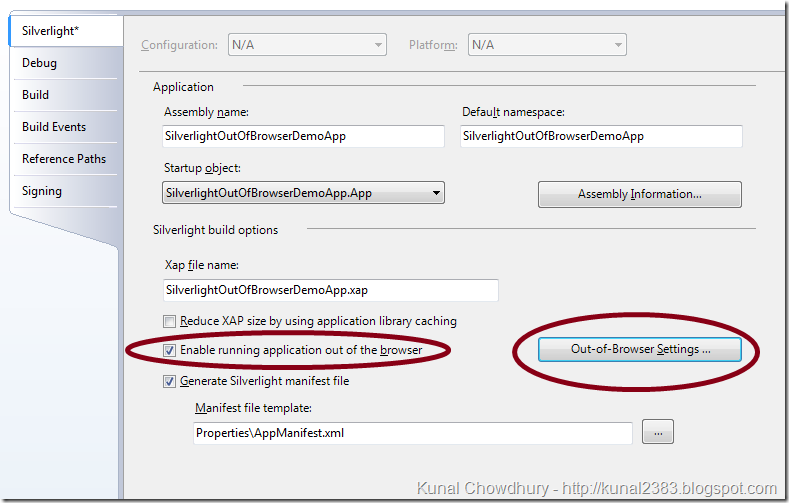
Run your application & click the Install button. You will come across Catastrophic Failure exception. Yes, right. This is because you didn’t mark the application as Out of Browser application. You have to explicitly tell it to be installed as out of browser. To do this, right click on your Silverlight project & go to properties. Enable the check box titled “Enable running application out of browser”.
image


Click on the button named “Out-of-Browser Settings…”. Here you can provide the title, size & icon for the install application. Now run your Silverlight application & right click on the page. You will find a new menu coming on the Silverlight context menu to install it as OOB (Out-Of-Browser). You can use the same menu item to install it. This will do the steps automatically. This comes automatically if your application supports the same. Here, we wrote our own code, so that, if we click on the button it will install. Hence, click on the button. This will show you a popup to install the application in your PC. If you go ahead this will install it on desktop & start menu. If successfully installed it will open the same as a standalone application. Close everything & go to the desktop. Open the installed application from the shortcut it generated. You will find that exact application is now available as a desktop application.


If you like this article, subscribe to our RSS Feed. You can also subscribe via email to our Interview Questions, Codes and Forums section.

Page copy protected against web site content infringement by Copyscape
Found interesting? Add this to:


Please Sign In to vote for this post.

Experience:3 year(s)
Home page:http://www.kunal-chowdhury.com
Member since:Monday, March 01, 2010
Level:Starter
Status: [Member]
Biography:He is currently working as a Silverlight application developer. Has a very good skill over C#, XAML, Silverlight & WPF. He has a good working experience in Windows 7 application (including Multitouch) development.

During his professional career he worked in various technologies & delivered quality output. He never hesitates to take up challenges & work on the latest technologies in Microsoft platform.

He attended various software development competition & achieved different awards.

He is presently focusing on the RIA (Silverlight & WPF) & willing to become a Technology Specialist in Microsoft platform. Learning newer things, Blog posting & helping others in forums is one of his regular activity.

Specialties: Silverlight Application Development, WPF Application Development, Windows 7 Application Development
>> Write Response - Respond to this post and get points
Related Posts

In this Article we are going to learn Silverlight controls like Grid and TextBlock and related properties.

In this article, we are going to learn about how to work with Services in Silverlight.

This Article will help to understand how the initial data required by Silverlight Application will be transfer to it from ASP.NET Page. This helps in transferring dynamic settings from ASP.NET Page to Silverlight application

As you all know that, Out-Of-Browser functionality in Silverlight is not a new feature. It is available since Silverlight 3. Microsoft added the trusted application behaviour in Silverlight 4 Beta. In addition to this, they introduced one more additional functionality called “Chromeless OOB WIndow” i.e. “Customized OOB Window” in Silverlight 4 RC (Release Candidate). In this post, I will guide you to create a simple customized OOB Window Application in Silverlight 4 RC.

Welcome again to Dotnetfunda. This is the last part of this series. The first part of the article , i demonstrated on how to create a wcf service that will be consumed by our silverlight application.

More ...
About Us | Contact Us | The Team | Advertise | Software Development | Write for us | Testimonials | Privacy Policy | Terms of Use | Link Exchange | Members | Go Top
General Notice: If you found plagiarised (copied) contents on this page, please let us know the original source along with your correct email id (to communicate) for further action.
Copyright © DotNetFunda.Com. All Rights Reserved. Copying or mimicking the site design and layout is prohibited. Logos, company names used here if any are only for reference purposes and they may be respective owner's right or trademarks. | 5/21/2012 7:52:16 AM